Want to play awesome music discs in your base? Crafting a jukebox is a fun and rewarding process that brings your world to life with tunes. Whether you are playing on Java Edition or Bedrock Edition, this guide will show you exactly what materials you need and how to put them together.
You can connect your jukebox to a hopper system to automatically pull music discs out when they finish playing!
Gather 8 Wooden Planks
To start, you will need 8 wooden planks of any wood type. You can chop down trees to get raw logs, then place those logs into your inventory crafting grid to convert them into planks.
Obtain 1 Diamond
You will also need 1 diamond. Diamonds are rare underground ores found deep in the world, usually below Y-level 16. Mine them using an iron pickaxe or better.
Open Your Crafting Table
Right-click or tap on your crafting table to open the 3x3 crafting grid interface. If you haven't made one yet, you can learn the basics via How to Make a Crafting Table.
Arrange the Materials in the Grid
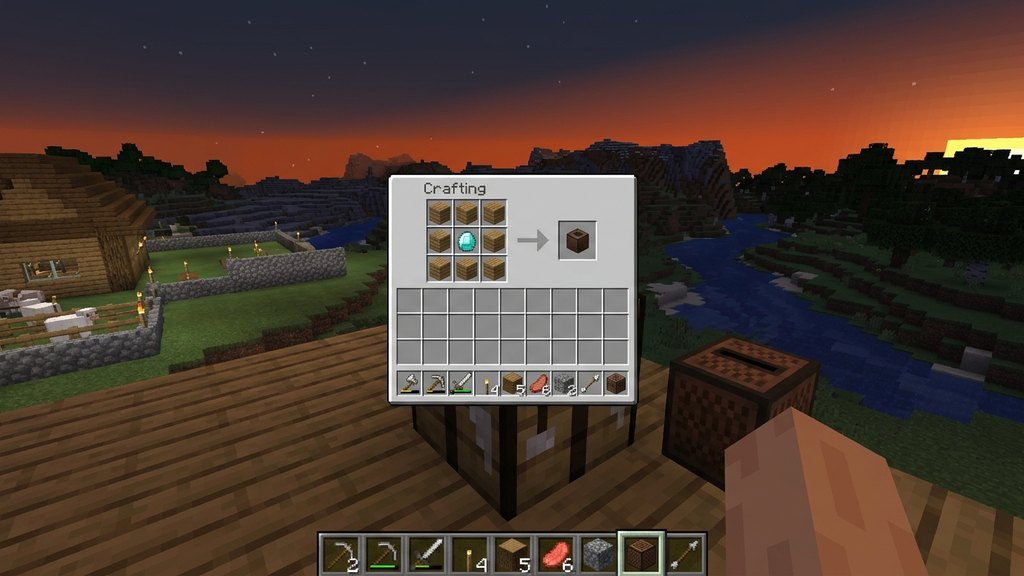
Place the 8 wooden planks in a ring around the outer edges of the 3x3 crafting grid, leaving the exact center square empty. Place your 1 diamond directly into that empty center square.
Move the Jukebox to Your Inventory
Once the correct pattern is set, the jukebox will appear in the result box on the right. Simply click and drag it into your inventory to finish crafting.
Frequently Asked Questions
How do you use a jukebox in Minecraft?
Place the jukebox on the ground, then hold a music disc in your hand and right-click or use the secondary action button on the jukebox to insert it and play the music.
Can you get music discs back after playing them?
Yes! Simply right-click or interact with the jukebox again while a disc is playing to pop the music disc back out.