Never lose your way back to your base again! A compass is an essential navigational tool in Minecraft that always points toward your world's spawn point where you first spawned. Whether you play on Java Edition or Bedrock Edition, crafting one is quick and simple once you have the right materials.
If you want to track a specific location instead of your world spawn point, try clicking a Lodestone with your compass to link them together!
Gather Iron Ingots
First, you will need 4 Iron Ingots. You can mine Iron Ore underground and smelt it inside a Furnace or Blast Furnace to get your ingots.
Obtain Redstone Dust
Next, you need 1 Redstone Dust. Redstone ore is found deep underground, usually below Y-level 16. Mine it using an iron or diamond pickaxe to collect the dust.
Open Your Crafting Table
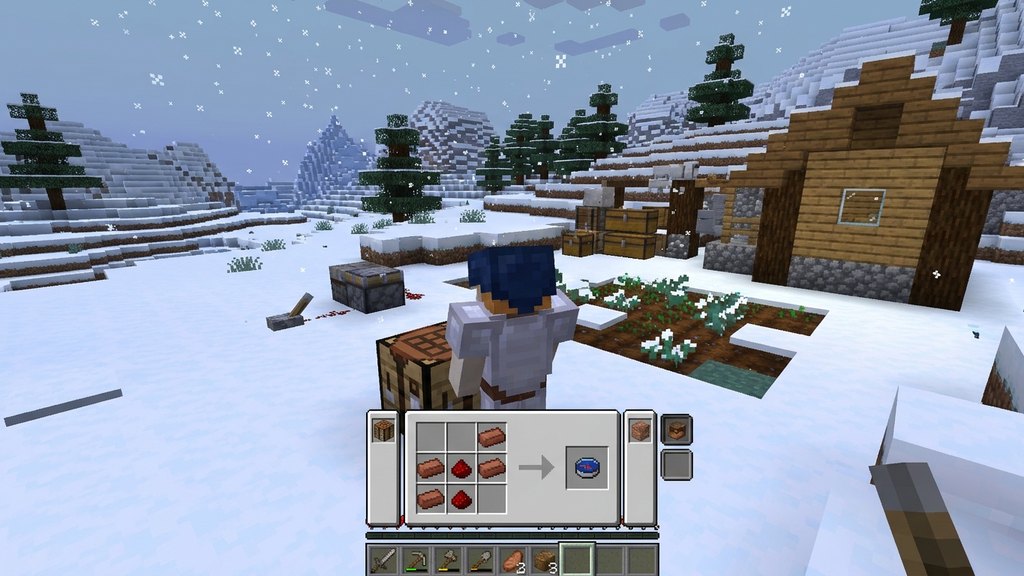
Right-click or tap on your Crafting Table to open the standard 3x3 crafting grid interface.
Arrange the Items on the Grid
Place the 1 Redstone Dust directly in the exact center slot of the 3x3 crafting grid. Then, place the 4 Iron Ingots around it: one directly above, one directly below, one directly to the left, and one directly to the right of the redstone dust.
Move the Compass to Your Inventory
Once the correct recipe pattern is set, the compass will appear in the result box on the right. Simply click and drag it into your inventory to start using it.
Frequently Asked Questions
What does a compass point to in Minecraft?
By default, a standard compass always points toward your world's original spawn point (where you first spawned when creating the world). In the Nether or End dimensions, it spins randomly and cannot find a direction.
Can I use a compass to find my bed?
No, a standard compass points to the world spawn, not your bed. However, you can craft a recovery compass (using echo shards) to point to your last death location in Java Edition.